Policy Rules Engine
DejaCode includes a Policy Rules Engine that continuously evaluates configurable compliance rules against your products and records violations. It provides a structured way to detect, track, and resolve compliance issues across usage policies, license coverage, and vulnerability exposure.
When a rule is triggered, DejaCode records a policy violation with a count of the affected packages and the detection date. Violations are automatically resolved when the underlying condition is corrected.
All rules are disabled by default. Each dataspace activates and configures the rules that are relevant to its compliance program via the Dataspace Configuration form.
1. Built-in Rules
Eight rules are available out of the box, organized into two categories: policy-based rules and vulnerability-based rules.
Policy-based rules
Rule type |
Label |
Severity |
Description |
|---|---|---|---|
|
Usage Policy Error |
Error |
Detects packages assigned a usage policy flagged with an error compliance alert. |
|
Usage Policy Warning |
Warning |
Detects packages assigned a usage policy flagged with a warning compliance alert. |
|
License Policy Error |
Error |
Detects packages whose licenses are assigned a usage policy flagged with an error compliance alert. |
|
License Policy Warning |
Warning |
Detects packages whose licenses are assigned a usage policy flagged with a warning compliance alert. |
|
License Coverage Gap |
Warning |
Detects packages with no license expression. |
Vulnerability-based rules
Rule type |
Label |
Severity |
Description |
|---|---|---|---|
|
Vulnerability Detected |
Error |
Detects packages with at least one known vulnerability. Supports an optional
|
|
Vulnerability Unresolved |
Warning |
Detects packages with known vulnerabilities that have no completed triage analysis (i.e., no analysis in a terminal state: resolved, resolved_with_pedigree, or not_affected). |
|
Vulnerability Stale |
Error |
Detects packages with high-risk vulnerabilities that have remained unaddressed
beyond a configurable number of days. Supports |
See also
Refer to Vulnerability Management for background on vulnerability fields such as risk score used by the vulnerability-based rules.
Severity levels determine how violations are displayed in the compliance tab:
Error rules are highlighted in red and indicate a critical compliance issue requiring immediate attention.
Warning rules are highlighted in yellow and indicate a condition that requires attention but does not necessarily block a release.
2. Violation Lifecycle
Each policy violation is a record associated with a product and a rule type. Its lifecycle follows these states:
Detected: the violation is created the first time a rule evaluation finds the condition triggered. The
detected_dateis set at this point and never changes.Active: the violation remains active as long as the condition persists across subsequent evaluations.
Resolved: when a rule evaluation finds the condition is no longer triggered, the violation is marked resolved and a
resolved_dateis recorded.Re-activated: if the condition recurs after being resolved, the existing violation record is updated in place (the original
detected_dateis preserved).
Only active (unresolved) violations are shown in the compliance tab and returned by the REST API.
3. Configuration
Policy rules are configured per dataspace using the Dataspace Configuration form in the Admin interface under Dataspaces > Dataspace configurations.
See also
For step-by-step instructions on enabling and configuring rules through the Admin UI, refer to How To 6 - Configure Policy Rules.
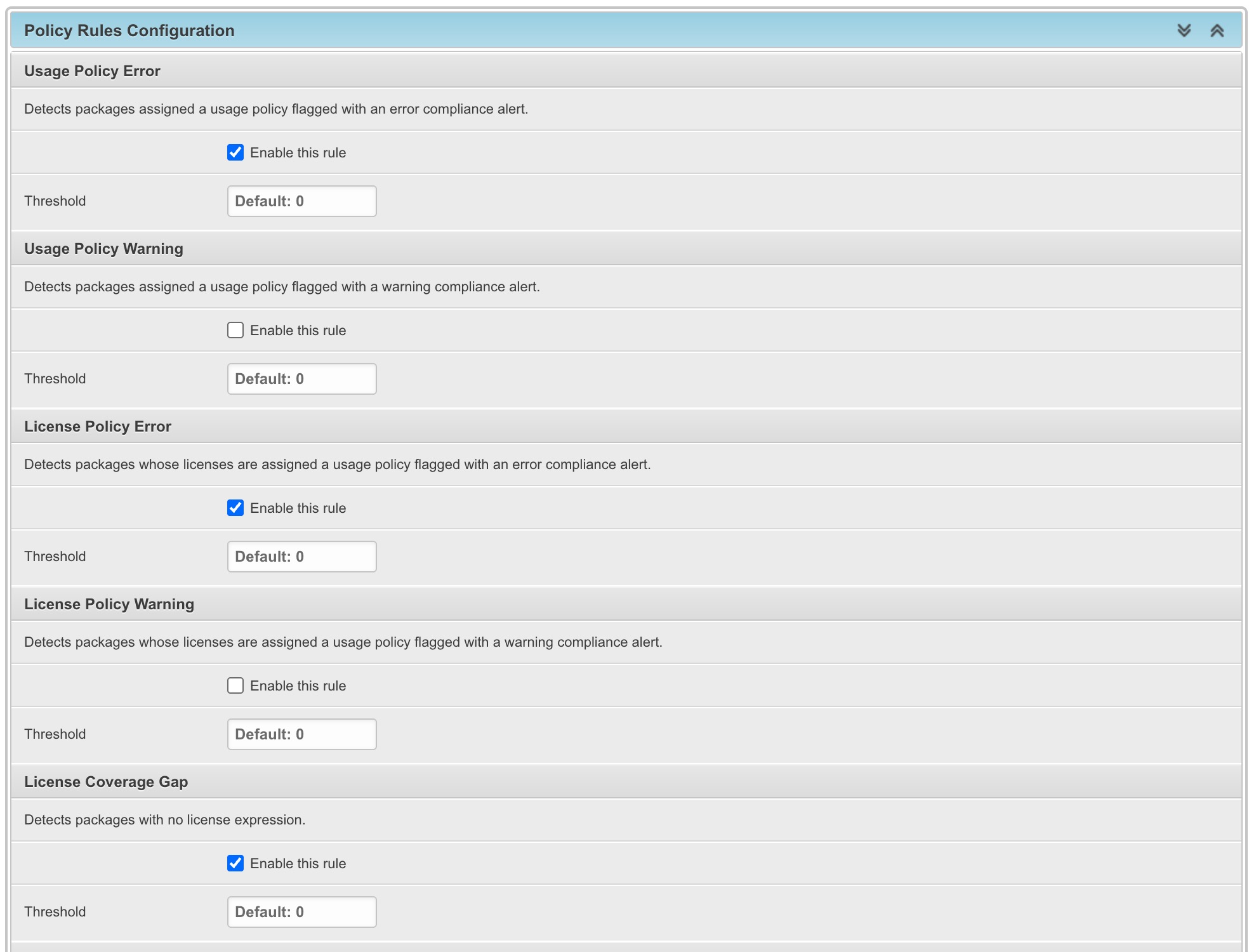
Each entry in the JSON object is keyed by the rule type and supports three options:
Key |
Description |
|---|---|
|
Boolean. Set to |
|
Integer. Violations are only recorded when the count strictly exceeds this value.
Defaults to |
|
Object. Rule-specific parameters (see parameter reference below). |
Example configuration:
{
    "usage_policy_error": {
        "is_active": true
    },
    "license_coverage_gap": {
        "is_active": true,
        "threshold": 2
    },
    "vulnerability_detected": {
        "is_active": true,
        "parameters": {
            "min_risk_score": 7.0
        }
    },
    "vulnerability_stale": {
        "is_active": true,
        "parameters": {
            "max_days": 14,
            "min_risk_score": 8.0
        }
    }
}
Note
Rules that are omitted from the configuration, or that do not have is_active
set to true, are skipped during evaluation and any previously open violations
for those rules are automatically resolved.
3.1 Rule Parameters
The following parameters are supported by rules that accept them:
Vulnerability Detected (vulnerability_detected)
min_risk_score(float, 0.0-10.0): only flag packages with at least one vulnerability whose risk score is greater than or equal to this value. When omitted, any vulnerability triggers the rule regardless of score.
Vulnerability Stale (vulnerability_stale)
max_days(integer): maximum number of days a high-risk vulnerability may remain without a completed analysis before the package is flagged. Defaults to30.min_risk_score(float, 0.0-10.0): only consider vulnerabilities whose risk score is greater than or equal to this value. Defaults to8.0.
4. Evaluation
4.1 Automatic Evaluation
Rules are re-evaluated automatically in the background (via the task queue) whenever any of the following changes occur:
A product is saved.
A package is added to or removed from a product.
A package record is updated (for example, a new vulnerability is linked to it).
The Dataspace Configuration is saved, which triggers re-evaluation of all products in the dataspace.
4.2 Manual Re-evaluation
Rules can also be re-evaluated on demand in two ways:
From the Product Administration form in the Admin interface, using the Evaluate policy rules bulk action on the product list.
From the compliance tab of a product detail page, using the re-evaluate button next to the policy violations panel.

5. Compliance Tab
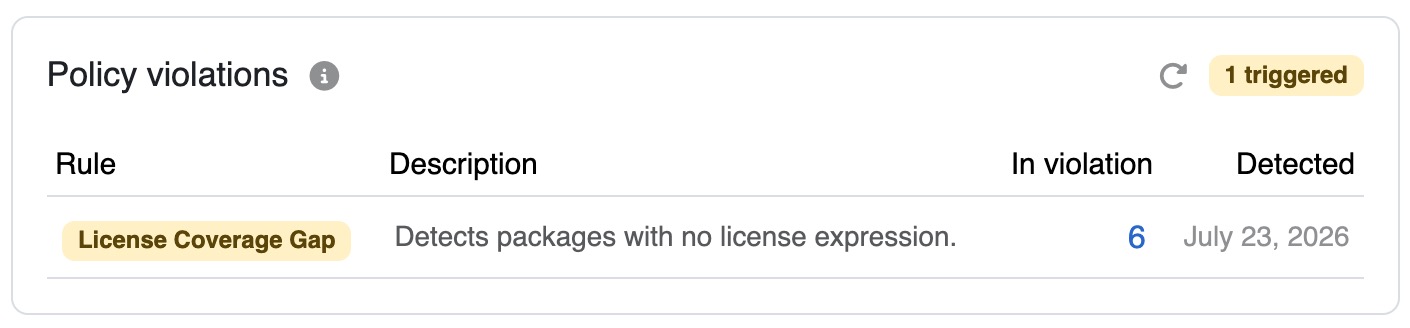
The Compliance tab on each product detail page displays an overview of active policy violations. For each triggered rule, the table shows:
The rule label and severity (color-coded badge).
The rule description.
The number of packages in violation, linked to the product inventory pre-filtered to show only those packages.
The detection date of the violation.
The badge count in the panel header reflects the total number of triggered rules. Its color is red if at least one error-severity rule is triggered, yellow if only warning-severity rules are triggered.
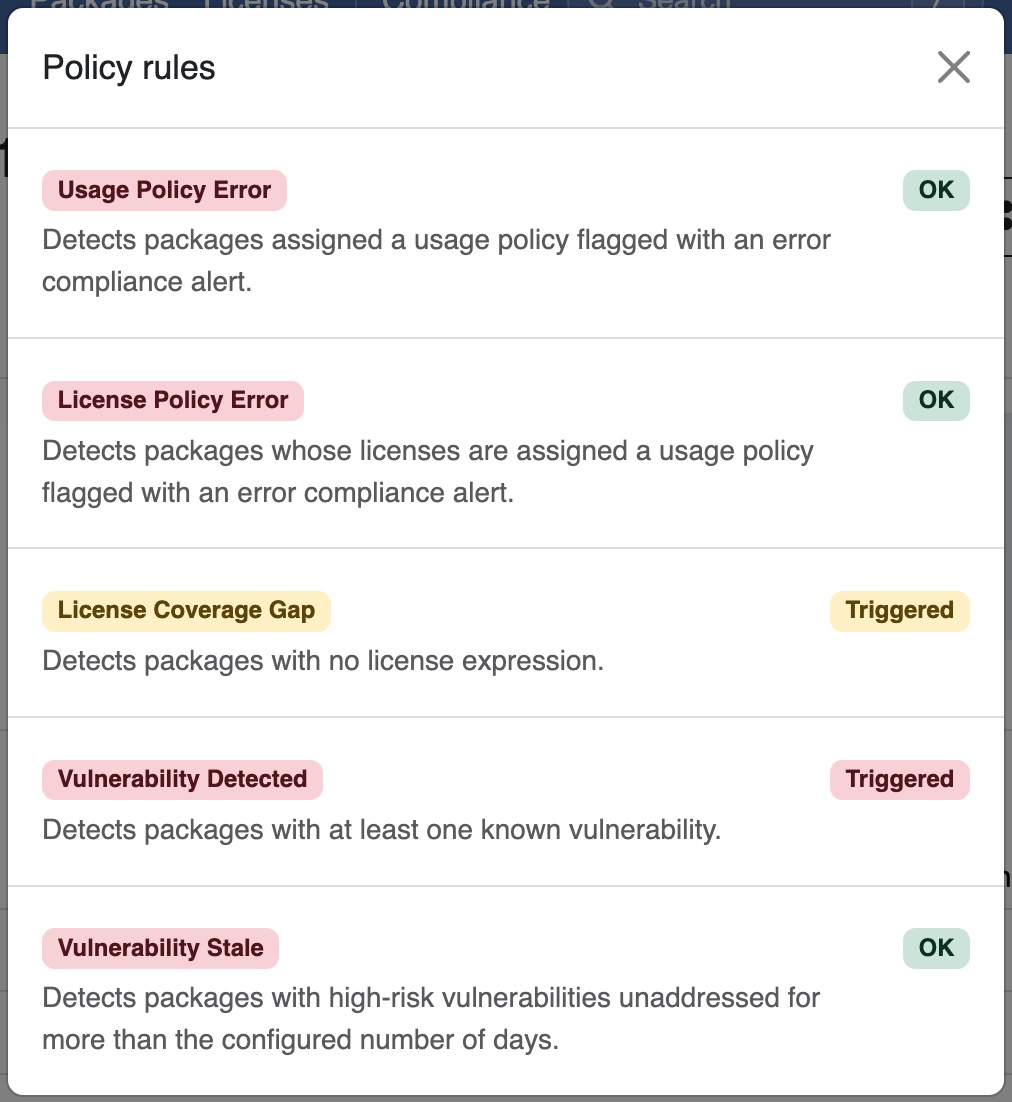
Clicking the info icon next to the panel title opens a modal listing all active rules with their current status: Triggered or OK.
6. Webhook Notifications
The policy rules engine fires webhook events when violations change state. These can be used to integrate DejaCode compliance alerts into external workflows such as Slack, ticketing systems, or CI/CD pipelines.
Two events are available:
policy.violation_detected: fired when one or more new violations are detected during an evaluation run. The payload includes the product name and a summary of triggered rules with their violation counts.policy.violation_resolved: fired when violations are resolved during an evaluation run. The payload includes the product name and the number of violations resolved.
See also
Webhook integration for instructions on configuring webhook endpoints and event subscriptions.
7. REST API
Active policy violations for a product are accessible via the REST API at:
GET /api/v2/products/{uuid}/policy_violations/
The response is a list of active (unresolved) violations, each including:
rule_type: the rule identifier (e.g.,vulnerability_detected).rule_label: the human-readable rule name.rule_description: a short description of what the rule detects.rule_severity:"error"or"warning".violation_count: the number of packages currently in violation.detected_date: when the violation was first recorded.
Only active (unresolved) violations are returned by this endpoint.
See also
Refer to the API documentation from the Tools menu for detailed guidance on authentication and available endpoints.